Java & Spring Boot — A Frontend Developer's Mental Model
My frontend work wrapped up ahead of schedule. Instead of waiting, I volunteered to help with the backend — a Spring Boot Java API I'd never touched before. My first instinct was to clone the repo and start reading code. I'm glad I didn't.
I spent a day mapping concepts first: what's the Gradle equivalent of npm install? What plays the role of middleware? Where does business logic actually live? That mental model session saved me from a week of confusion. This article documents what I put together.
If you're in a similar situation — FE background, suddenly touching Java — this is the map I wish I'd had. We'll skip the "Java is verbose" jokes and get straight to the mappings that actually help you read and navigate a Spring Boot codebase.
Non-engineers: Spring Boot is a Java framework used to build backend APIs — it handles routing, business logic, and database access much like Express.js, but for the JVM.
The Build Tool: Gradle Is Not npm, But Close Enough
Your instinct when joining a new project is to npm install. In Gradle, the equivalent is:
./gradlew buildThe ./gradlew wrapper is bundled in the project — you don't need a global Gradle install, similar to how some teams ship npx scripts. Here's the full cheat sheet:
| Concept | Frontend (npm) | Java (Gradle) |
|---|---|---|
| Config file | package.json | build.gradle |
| Lock file | package-lock.json | gradle.lockfile |
| Install command | npm install | ./gradlew build |
| Add dependency | npm install pkg | Manually add to build.gradle + rebuild |
| List dependencies | npm ls | ./gradlew dependencies |
| Packages stored in | node_modules/ (per-project) | ~/.gradle/caches/ (global, shared) |
| Registry | npmjs.com | Maven Central |
One key difference: no bundle size concern on the Java side. Dependencies run on the server, so you're not paying a download cost for adding a library.
Dependency Scopes
| Gradle scope | npm equivalent | Purpose |
|---|---|---|
implementation | dependencies | Production code |
testImplementation | devDependencies | Test code only |
compileOnly | — | Compile-time only (e.g., Lombok) |
runtimeOnly | — | Runtime only (e.g., DB driver) |
Files you'll care about:
-
build.gradle— treat it likepackage.json+ your bundler config combined. Read this. -
settings.gradle— repo-level config and subprojects. Skim it. -
gradle.properties— like.envfor the build. Skim it. -
gradlew— just run it, never edit it.
Visit the Gradle DSL Reference for build.gradle — think of it as the MDN for Gradle. 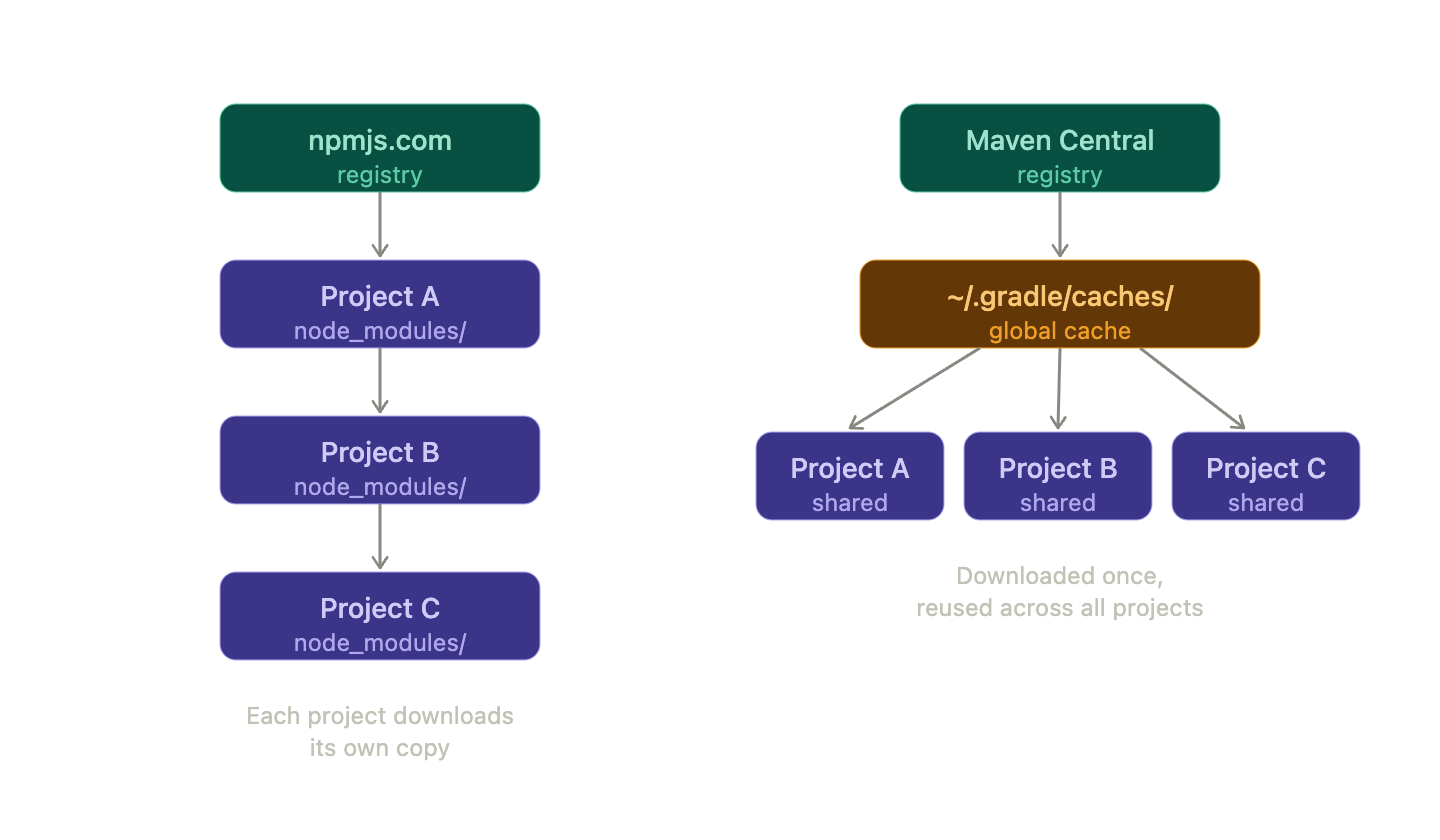
node_modules/; Gradle resolves globally into ~/.gradle/caches/ and reuses across projects. Project Structure: Feature-Based, Not Layer-Based
Spring Boot projects can be organized several ways. The most common pattern you'll encounter in production codebases — and what the official Spring PetClinic sample demonstrates — is organizing by feature (domain), not by layer.
The older "layered" approach puts all controllers together, all services together, and so on:
# Traditional — hard to scale
com.example.app
├── controller/
├── service/
├── repository/
└── model/
The modern approach used in scalable production apps groups by domain first, layers second:
# Feature-based (what you'll likely see)
com.example.app
├── common/       → Shared utils, constants, DTOs, exceptions
├── config/       → App-wide Spring configuration
└── domain/
    ├── user/
    │   ├── controller/   → Route handlers
    │   ├── service/      → Business logic
    │   ├── repository/   → DB queries
    │   ├── entity/       → DB table models
    │   ├── dto/          → Request/response shapes
    │   └── converter/    → Data transformers
    ├── order/
    │   └── ...
    └── product/
        └── ...
This is sometimes called Vertical Slice Architecture or Package by Feature. The Spring PetClinic project organizes by domain (owner/, vet/, visit/), each containing its own controller, service, and repository. A more recent modular variant takes this further with Spring Modulith, where modules communicate only through events — no direct cross-module bean injection.
Why this structure? When a team works on the order feature, they only need to open the order/ folder. Nothing leaks. When the app grows, each domain can theoretically be extracted into its own microservice.
The internal layers within each domain follow a consistent pattern:
| Layer | Responsibility | FE equivalent |
|---|---|---|
controller/ | Handle HTTP requests/responses | Route files (pages/api/users.ts) |
service/ | Business logic | Custom hooks / Zustand actions |
repository/ | Database access | Prisma / Drizzle queries |
entity/ | Database table models | TypeScript interfaces for DB rows |
dto/ | Request/response shapes | Zod schemas / response types |
converter/ | Transform between layers | Lodash mappers / data adapters |
HTTP Request Flow
Let's trace what happens when a request hits the server:
HTTP Request
    ↓
Filter (e.g., request logging, auth header extraction)
    ↓
Controller (@RestController)  ← handles routing + request/response shape
    ↓
Service (@Service)            ← business logic lives here
    ├── Repository (@Repository) → MySQL / PostgreSQL
    ├── External API Client      → third-party HTTP calls
    └── Converter (@Component)   → transforms data between layers
    ↓
Response wrapper (standard success envelope)
    ↓
HTTP Response

    On any error:
Service / Controller → Global Exception Handler (@RestControllerAdvice)
                     → Error response envelope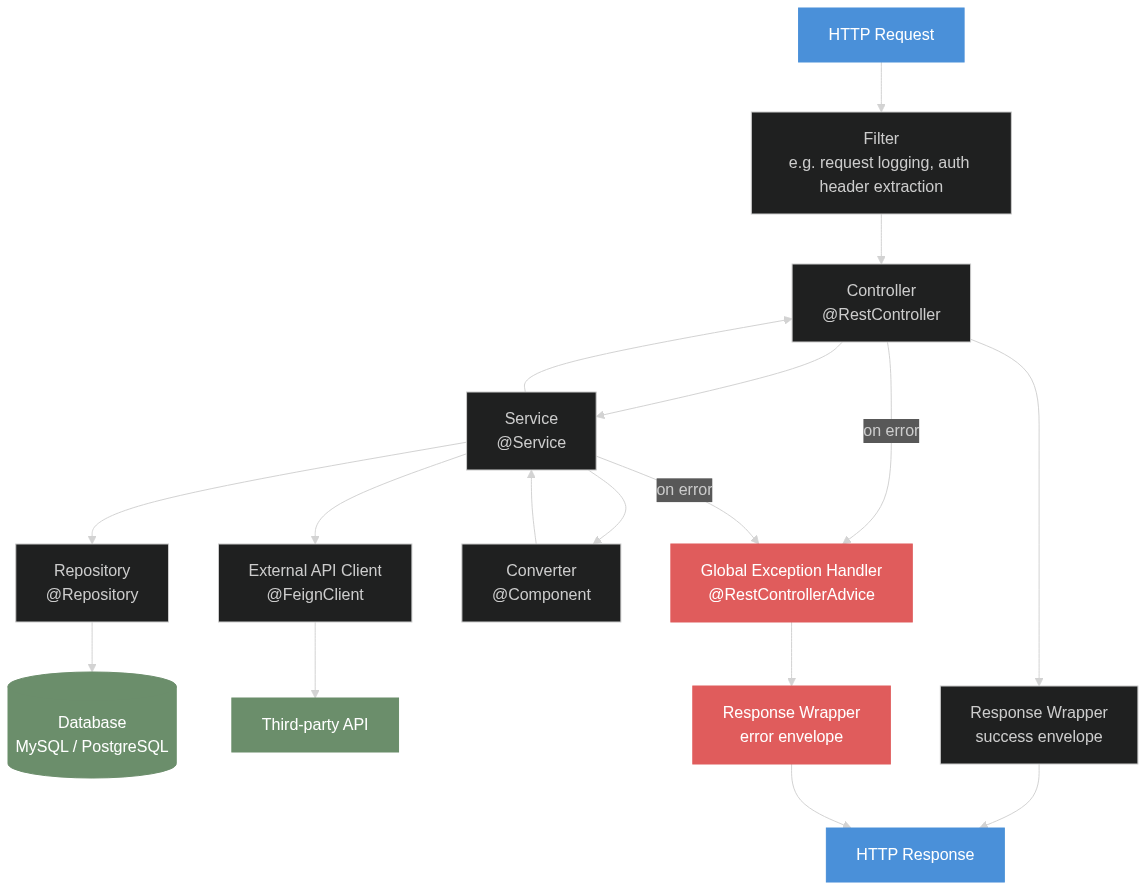
The FE ↔ Spring Boot concept map:
| FE | Spring Boot |
|---|---|
Route file (pages/api/users.ts) | @RestController + @RequestMapping |
express.json() middleware | @RequestBody (Jackson auto-deserializes JSON) |
| Auth middleware | @RequestHeader("X-Auth-Token") or a filter |
| Express error handler | @RestControllerAdvice + @ExceptionHandler |
axios instance / fetch wrapper | @FeignClient (Spring Cloud) |
| React hook / Zustand store | @Service class |
| Prisma / Drizzle | @Repository (Spring Data JPA) |
| TypeScript interface / Zod schema | DTO class + @Valid annotations |
morgan / pino logger | OncePerRequestFilter + SLF4J |
React <ErrorBoundary> | @RestControllerAdvice |
The one that trips up most FE devs: Feign Client. It's a Spring Cloud library that lets you declare an external HTTP client as a Java interface — no axios config, no base URL in every call. You annotate an interface and Spring generates the implementation at startup.
Spring DI: The "Magic" Explained
The most disorienting part of a Spring Boot codebase is that classes seem to appear out of nowhere and connect to each other automatically. Here's how that works.
@SpringBootApplication triggers component scanning — Spring scans all classes under the base package and registers any class with these annotations as a bean:
| Annotation | Purpose |
|---|---|
@Component | Generic bean |
@Service | Business logic bean |
@Repository | DB access bean |
@RestController | HTTP route handler bean |
@RestControllerAdvice | Global error handler bean |
@Configuration | Config class (contains @Bean methods) |
@FeignClient | External API client bean |
Bean = a Spring-managed singleton. Created once at startup, shared everywhere. Think of Spring's DI container as a Map<Type, Instance> — it looks up which bean to inject based on type.
Constructor Injection (the standard pattern)
@Service
@RequiredArgsConstructor        // Lombok: generates constructor
public class OrderServiceImpl {
    private final OrderRepository repository;  // Spring injects this
    private final OrderConverter converter;    // Spring injects this
}
Two separate tools at work:
Lombok (compile time):  @RequiredArgsConstructor → generates constructor
Spring (runtime):       reads constructor → finds matching beans → injects
Lombok doesn't know about Spring. Spring doesn't know about Lombok. They work together because Lombok generates code that Spring understands.
What fails and why:
| Scenario | Result |
|---|---|
Class missing @Service / @Component | App fails to start: UnsatisfiedDependencyException |
| Two implementations for one interface | App fails to start: use @Primary or @Qualifier |
Injecting a plain String | Use @Value("${property.name}") instead |
Performance Reality Check
Spring Boot gets a lot of grief for startup time. This is real — but worth understanding.
Why startup is slow
Go / Rust:   Execute binary → done
Node.js:     Start V8 → load JS → done
Spring Boot: Start JVM → load 10K+ classes → scan annotations
             → wire beans → init DB connection pools
             → run migrations → JIT compile hot paths
What actually consumes resources at runtime
| Resource | Impact |
|---|---|
| DB connection pool (HikariCP) | High — each connection ≈ 1–5 MB |
| HTTP connection pools (Feign clients) | Medium |
| Bean instances (~300–500 in a typical app) | Negligible |
Bean count is not your bottleneck. Connections are.
Runtime comparison
| Runtime | Startup | Memory (idle) | Peak throughput |
|---|---|---|---|
| Rust | 1–20ms | 5–20 MB | Very high |
| Go | 5–50ms | 10–30 MB | High |
| Node.js | 100ms–2s | 50–150 MB | Medium |
| Java (Spring Boot) | 5–60s | 200–500 MB | Very high (after JIT) |
Java's slow startup doesn't mean slow runtime. After the JVM's JIT compiler warms up, throughput is competitive with anything short of Rust. GraalVM Native Image compiles Spring Boot to a native binary — 50–200ms startup, 50–100 MB memory — if startup time is a hard requirement.
Java's real moat is the ecosystem (25+ years of libraries) and the hiring pool. Go is the rising challenger for new greenfield projects.
Summary
If you remember one thing: Spring Boot maps almost directly onto the backend you already know from Node.js/Express — routes, middleware, services, DB access, error handling. The annotations (@Service, @Repository, @RestController) are just markers that tell Spring to manage those classes for you. Once you stop treating the DI magic as magic and start reading it as "Spring wires these classes together at startup," the codebase becomes readable.
Make sure to explore the Spring PetClinic on GitHub — it's the canonical Spring Boot sample app and a great reference for how a well-structured project looks in practice.
Hope this helps!
Surya Darma Putra is a fullstack engineer. You can reach him at suryadarmaputra.com.